MyQ enables print fleet management, simplifies workflows, and provides comprehensive reports to enable you to control document security, improve sustainability, and reduce costs.


MyQ
Secure print fleet management and reporting
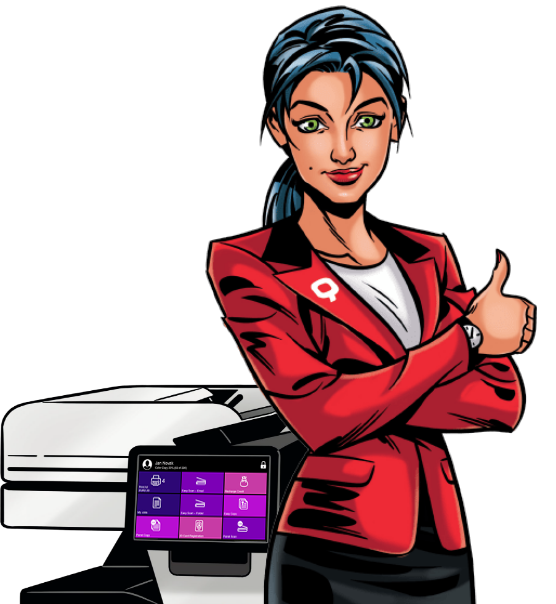
MyQ is a server-based application designed to protect your confidential data, manage the overall document output and related printing costs.
Thanks to the Print-&-Follow function embedded in MyQ, the documents sent to the printer remain in the system and can be securely printed from any device.
MyQ allows you to control the overall output and provides detailed reports by device, user, department, or for your whole fleet.

Printing, copying and scanning starts only after the user has logged in at a selected device, using the authentication methods set by your security requirements.
Users can track their printing volumes and managers can better control and reduce printing costs. The tracking of prints alone can help decrease the number of printed pages.
REQUEST A CALLBACK
Speak to our team and we will design a solution that fits your immediate and future business requirements.

For Managers
Increase Efficiency
Clear print rules and personalized one-click scan/print/copy buttons help your team stay efficient when operating MFPs. You’ll see the benefits as times saved for your more important tasks.
Prevent Data Loss
Ensure that internal data processed through printers stays in the right hands. By authorizing and restricting user rights, you can limit access to sensitive files such as production schedules, payrolls or business proposals.
Control Print Costs
Keep track of your print spending with advanced accounting. You are empowered to assign print jobs to projects or cost centres and generate detailed reports with your favourite BI tool.
Protect the Environment
Align green printing with your organization’s sustainability policies. MyQ X offers numerous eco-friendly tools and policies to help you reduce use of consumables and save energy.
For Users
Know Where to Click
Find your way around the printer control panel. MyQ X’s intuitive user interface guides you effortlessly through your printing tasks. Streamlined functions make operating the MFP quick and easy.
Be Mobile with Your Docs
Queue your documents from anywhere in the office with your mobile or tablet. Get your files ready to print in the MyQ X Mobile Client, tweak settings, and print at any MFP.
Secure Your Documents
No more worries about other people accessing your printed docs. Your files will be released for printing only after your secure authentication at the printer.
Complete Your Tasks
Don’t lose unfinished work due to a device error. The system will alert you before your work is affected. You can simply go to the next unoccupied printer and finish your work there.

For IT Specialists
Simplify Deployment
Install MyQ X on multifunction printers on your network within minutes. The system will automatically discover printers, install print drivers, and deploy the MyQ X embedded terminal. Plus, you can do all this remotely.
Manage the Fleet Centrally
Oversight of the printer fleet from one place. See the status of all your connected multifunctional printers and manage them via the web UI. If a problem occurs, you will receive an automatic notification.
Increase Efficiency
Help your colleagues complete their printing tasks more efficiently and define personalized workflows for users/groups. Select the functions that best fit their needs.
Reduce Print Costs
Set up print credit and/or quotas to help your company keep print volumes under control. Reduce consumable wastage by setting up mandatory print policies such as two-sided printing.
REQUEST A CALL BACK
To discuss how Foldr could benefit your business, request a call back from one of our team.
MyQ X for Epson - READ MORE >>
MyQ X for Epson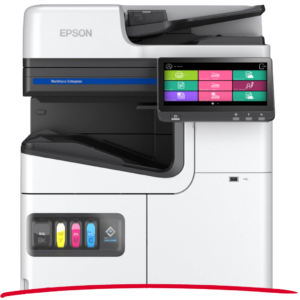
See what their joined forces bring you
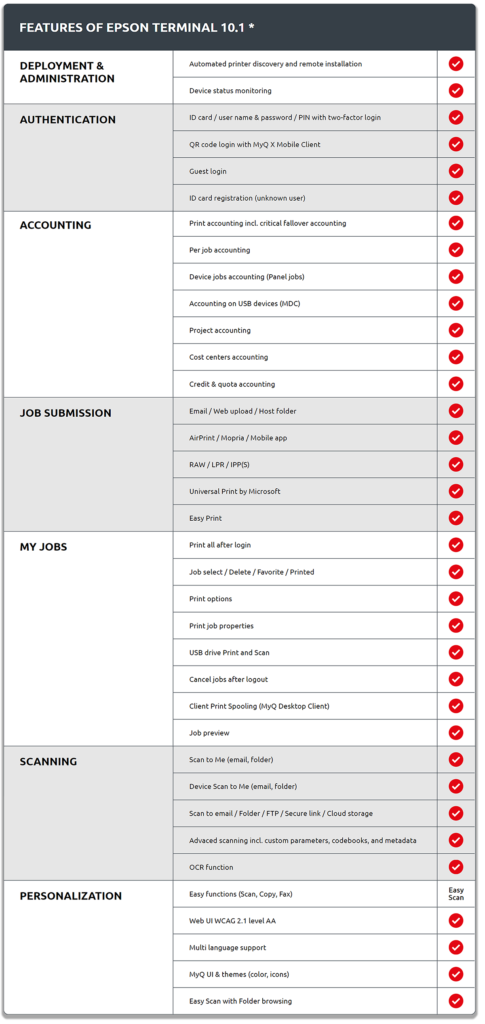
MyQ X is up and ready to run on any Epson multifunction printer supporting the Epson Open Platform {EOP). It boosts Epson printers with enhanced mobile printing, advanced security, and the MyQ X intuitive Epson Embedded UI {User Interface), while also staying in line with Epson’s environmental approach to sustainable printing.
FEATURE DIGEST
Improve Your Eco-Friendly Printing
Environmental Awareness
Epson is committed to developing sustainable products that keep the environment in mind from conception to completion. Their heat-free and minimum waste-producing devices represent a significant step towards long-term sustainability using up to 83% less power than laser printers and MFPs in the same class. This is where the Epson path meets with MyQ. Thanks to specific user policies, awareness functions, and environmental reports, our print solution helps you minimize the negative environmental impact of document processing.
Print Flexibly from Your Device
Mobile Print
Expand your BYOD (Bring Your Own Device) with a handy printing app. The versatile MyQ X Mobile Client (Available for Android and iOS) lets you print from your smartphone or tablet, log in touch less to the Epson printer, recharge print credit, and, of course, manage your print settings. Choosing your print preferences such as BW/colour one- or two-sided is just a few taps away on the mobile device of your choice.
Leave Your Docs in Safe Hands
Secure Print
Safety goes first for your print jobs as well. You can secure the Epson multifunction printers with two-factor authentication. You can log in to the device with a QR code using the MyQ X Mobile Client or (a two-factor combination of) an ID card, PIN code or username + password. MyQ’s pull-printing ensures the safe retrieval of the printed files after login. You can further secure scanned files with features like watermarks or digital signatures.
Reach the Printer from Anywhere
Hybrid Workplace
Long gone are the days of office-only working. MyQ X lets you print, regardless of your hybrid workplace location. At remote locations, you can take advantage of the MYQ Desktop Client which provides functionality similar to that of a print server such as job management, local device monitoring, fallback printing etc. Plus, you can use MyQ’s seamless integration with Microsoft’s Universal Print Service to print on the move virtually from anywhere if you have an internet connection. This way, you send your files to a queue and safely retrieve them at the Epson printer in the office.
ADMIN’S CORNER
 MyQ X on Epson within Minutes
Quick Installation
Deploy MyQ X’s embedded solution on the Epson EOP devices in a breeze. You can perform the entire process remotely through the MyQ X admin dashboard. With automated device discovery, MyQ scans your company’s network for Epson printers, adds them to the system and helps you set up the corresponding Epson printer drivers, easy as that and you are done.
Control Fleet from Anywhere
(Remote) Fleet Management & Monitoring
Never lose track of the state of your devices with the MyQ X Admin dashboard. From there, you can control and set up the entire printer fleet remotely from one location. You can create specific user policies for various users or groups and much more. MyQ X also helps you monitor the state your devices are in. If there is an issue e. g. a jammed paper, or consumables about to run out, you will be the first one to know. With preconfigure event actions you will be able to proactively predict print device related issues and keep IT tickets to a minimum.
Boost Work Productivity
Personalized Workflows
Every team has a different work agenda as well as different printing needs. The front desk might only require simple, straightforward printing, while HR could appreciate advanced scanning workflows to different (cloud) destinations. MyQ X gives you a broad range of print/copy/scan workflow personalization options that you can set up for different users/user groups. In this way, users will be efficient with their document processing, as they will only find the workflows, they truly need on the Epson printer panel.
Bring Printing Costs under Control
Advanced Accounting & Reporting
MyQ X keeps track of every page that users process, and it accurately accounts for it. With MyQ’s detailed accounting you will always be able to keep an eye on your organization’s print volumes and spendings. Additionally, you can set up project, group, or even cost centre accounting modes for users-when processing documents, the user selects where it should be accounted. You can also implement MyQ’s Credit or Quota functionality to promote responsible behaviour and recover costs, respectively.
MyQ X provides you with detailed reports of the overall print activity, where you can easily evaluate your print costs. Our print solution is also compatible with various BI tools, so you can use them for customized reporting.
You Make the Print Rules
User Policies
In the MyQ X admin dashboard, you can seamlessly create print policies that follow your organization’s rules. These policies can be applied on a user, group or even on device level (e. g. the accounting department). Typically, you can set specific print settings such as default two sided/duplex printing, default colour printing to mono and much more. In this way, you can encourage responsible print behaviour and significantly reduce print waste.
MyQ X for Ricoh - READ MORE >>
MyQ X for Ricoh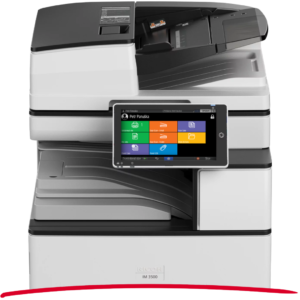
The perfect fit for flexibility & mobility
MyQ is all set to run on your Ricoh multifunction printers! They MyQ X print solution enriches Ricoh devices with flexible features for mobile and remote work with documents, airtight security, and unique fallback printing. You’ll also get personalized one-click workflows as well as a variety of tools to help you manage your print costs.
FEATURE DIGEST
Achieve Your Sustainability Goals
Greener Printing
Ricoh promotes a more sustainable way of producing print devices and managing its business. Their long-term goals include CO2 reduction and switching to renewable energy. MyQ X supports Ricoh on this mission with a set of green printing features. Print policies (two-sided, B&W printing) help you limit consumable waste, efficient workflows save electricity with users spending less time at the printer. You can also make users more aware of their printing with pop-ups, quotas, or print credit.
Get Document Flexibility
Hybrid Workplace
Modern workplaces often include remote and flexible work and so does MyQ X. To have your documents on you anytime, anywhere, you can simply scan them to one of the numerous supported cloud storages like Google Drive, OneDrive, or Dropbox. To queue documents for printing from anywhere, take advantage of MyQ X’s integration of Universal Print by Microsoft. Safe printing outside the office is also not an issue, use the free MyQ Desktop Client and process your files securely with accounting and monitoring.
Print from Your Device
Mobile Print
BYOD (Bring Your Own Device) adds a new level of work flexibility to printing as well. MyQ’s free native Android/iOS app, MyQ X Mobile Client, lets you send documents to your Ricoh printers from anywhere in the office. Queue your files on your way to a meeting, log in with a QR code, and release the documents from your phone/tablet. The Client also allows you to change print settings (colour, format, etc.), change PIN, or recharge credit.
Shield Your Printing
Secure Printing
Your sensitive print data should never end in the wrong hands and MyQ X makes sure of that. All information going through the print environment on the user-server-printer path is thoroughly encrypted using the latest protocols and technologies. You will prevent unauthorized printer access with safe (multifactor) login with an ID card, PIN, or username + password. Plus, with pull printing, you will be able to release the prints only after authentication at the device.
Bring Efficiency to Scanning
Easy Scan
Scan in the format you need to the destination of your choice without having to tap on ten different buttons, wasting your precious time. You can have your personalized scanning function on your Ricoh printer panel under one single button. When you press it, the system will automatically send it to an email, cloud, or local folder in the desired format. You can also add in OCR (Optical Character Recognition) and turn your scans into searchable PDFs.
ADMIN’S CORNER
Deploy MyQ X on RICOH in a Flash
Quick installation
Getting your Ricoh multifunction printers MyQ X-ready will take only minutes and requires no extra effort. Once the devices are plugged in and connected to your local network, MyQ X automatic discovery scans it and finds new devices on its own. Afterward, it installs all Ricoh drivers necessary as well as the print solution. You can launch the entire process remotely without having to be present by the devices.
Print without Server Connection
Device Spooling
Server down? This won’t stop your printing anymore! With MyQ X, your Ricoh printers get a unique failover option that allows users to print even if the connection crashes. If the Device Spooling function is turned on during an outage, the queued print jobs get safely stored in the printer’s internal memory and will be printed after authentication. Offline accounting data will automatically be updated on the server as soon as connectivity is re-established.
Keep Print Costs Down
Advanced Accounting & Reporting
If not monitored properly, printing can become quite costly. MyQ X helps you track every page that’s been printed, copied, faxed, or scanned so that your print costs will never get out of hand. When processing a document, users can assign their job under a project or group to help you track and allocate costs with more detail. You can also limit users’ print volumes by creating a quota or credit system and check their overall spending by exporting customizable print reports via various compatible BI tools such as Microsoft Power BI.
Control Your Devices Smoothly
Printer Management & Monitoring
Always stay in touch with your printer fleet. You can easily monitor and manage it from the intuitive web-based Admin dashboard. There, you will find an overview of all your connected printers. You can proactively check the device status and avoid getting flooded with print-related IT tickets. If an error occurs, you receive an automatic notification so you can solve it right away. And of course, you can tweak various printer settings right in the web UI.
Maximize Print Productivity
Personalized workflows
Your colleagues surely have better things to do than standing by the printer, searching for the proper button to press. Make their print life easier and create personalized copy/scan buttons that fit their true document needs. You can preset the format and destination of the workflow for a specific user (Mike from accounting) or user group (HR department). Once logged in, users find only the workflows they want to use on the printer panel.
MyQ for Kyocera - READ MORE >>
MyQ for Kyocera
MyQ for Sharp - READ MORE >>
MyQ for Sharp